AI for Small Restaurants: Complete Guide (2026)
Discover how AI tools can transform your small restaurant. From voice ordering to menu optimization, learn which solutions fit your budget and how to.
It’s 7 PM on a Friday. Your dining room’s packed, the phone won’t stop ringing, and you’re calculating how much revenue walks out the door with every unanswered call.
I’ve watched this scenario play out in dozens of small restaurants. Here’s what I’ve learned: AI isn’t about replacing your staff or turning your cozy spot into a soulless tech operation. It’s about eliminating the chaos—the missed orders, the overstaffed shifts, the food waste eating your margins.
Restaurant AI tools in 2026 are more accessible than ever. According to McKinsey’s 2026 restaurant industry analysis, the sector is reaching a turning point where technology adoption is becoming essential for competitiveness. In this guide, I’ll show you exactly which solutions work for small operations, what they cost, and how to implement them without disrupting service. If you’re just starting with business automation, check out our guide on AI tools for small businesses to understand the fundamentals.
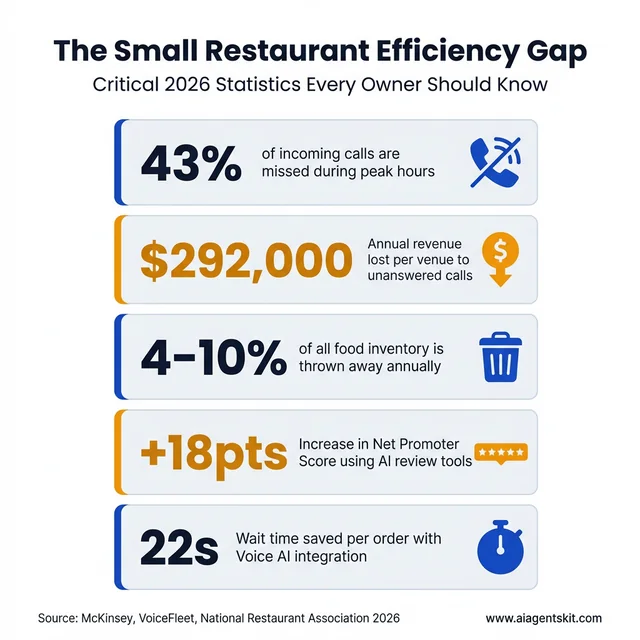
The Small Restaurant Efficiency Gap: 2026 Key Metrics demonstrating the impact of missed calls and waste.
What Is AI for Restaurants? (And Why It’s Not Just for Big Chains)
Artificial intelligence for restaurants is software that learns from your data—sales history, customer patterns, staffing levels, inventory usage—and uses that learning to automate decisions or surface insights you’d otherwise miss. Think of it as restaurant automation technology that gets smarter over time.
Think of it like this: instead of guessing how many servers you need next Thursday based on “how it felt” last year, AI analyzes every Thursday you’ve been open, factors in local events, weather patterns, and seasonal trends, then tells you: “Schedule 4 servers, not 6. You’ll be slower than usual.”
The reason this matters for small restaurants specifically? You have thinner margins and less room for error than the big chains. A Chipotle can absorb a 10% overstaffing mistake. You probably can’t.
Here’s what surprises most owners I talk to: you’re probably already using AI without realizing it. If you use Square, Toast, or most modern POS systems, their “smart” features—like sales forecasting or automatic reorder suggestions—those are AI. The difference in 2026 is that specialized restaurant AI tools have become powerful enough and cheap enough that even a 20-seat family restaurant can compete with chains on operational efficiency.
And unlike the massive enterprise systems that chains use, these new tools are built for owners who don’t have an IT department. Most take under an hour to set up and start showing results within days, not months. For a broader view on building your AI approach, read our guide on developing an AI strategy for small business.
The Real Problems AI Solves for Small Restaurants
Let me get specific about what actually changes when you bring AI into your operation. These aren’t theoretical benefits—they’re the exact pain points I hear about from owners every week.
The 30% of Calls You’re Missing
Here’s a statistic that should keep you up at night: restaurants miss approximately 43% of incoming calls during peak hours according to research from VoiceFleet and Hostie AI. The average venue loses up to $292,000 annually in lost business from unanswered calls. Not because you’re lazy—because you’re human, and there’s only one of you, and you can’t answer the phone while you’re running food or handling a customer complaint.
I watched a Thai restaurant in Portland discover they were losing $3,200 per month in missed takeout orders alone. The owner thought her voicemail was catching most calls. It wasn’t. People hang up after 3 rings and order from the competitor who answers.
Voice AI—essentially an automated phone system for restaurants—solves this. It picks up every call instantly, takes orders, answers common questions (“What time do you close?”), and can even handle reservations. According to GitNux’s 2026 restaurant AI report, AI voice ordering at drive-thrus has achieved 91% accuracy rates while cutting wait times by 22 seconds. Modern restaurant voice AI sounds surprisingly natural, not like the robotic phone trees everyone hates.
The best part? These systems integrate directly with your POS, so orders flow straight to the kitchen without someone having to manually enter them. That means fewer errors (no more “I thought they said 4 orders of spring rolls” mistakes) and faster service.
Staffing Chaos and No-Shows
If you’ve ever had your best server call in sick on a Saturday night, you know the panic. You’re suddenly trying to cover 40 tables with half your normal staff, and the customers can feel the stress.
AI scheduling tools analyze your historical sales data alongside factors like local events, weather, and seasonality to predict exactly how busy you’ll be. Instead of overstaffing “just in case” and eating the labor cost, you get precise recommendations: “Tuesday lunch will be slow—send someone home early. Friday dinner will be slammed—call in your part-timer.” According to Modern Restaurant Management, 40% of operators believe labor efficiency and scheduling are the top areas where AI can deliver meaningful improvements.
Some systems even monitor clock-ins in real-time and automatically suggest shift swaps or call-ins when someone’s running late. It’s not about replacing your scheduling judgment—it’s about giving you data to back up your instincts.
Food Waste Eating Your Margins
The average restaurant throws away 4-10% of the food they purchase. For a restaurant doing $500,000 in annual revenue, that’s $20,000-$50,000 literally in the trash. According to ReFED’s 2025 Foodservice Sector Report, surplus food from foodservice was valued at $157 billion in 2024—equivalent to 14% of foodservice sales. AI-powered inventory management and demand forecasting are helping restaurants cut this waste significantly by predicting exactly what they’ll need before they order.
AI inventory management tracks your actual usage patterns (not just what you ordered) and predicts exactly what you’ll need for the next few days. Instead of over-ordering produce “just in case,” you get precise par levels based on historical sales, weather, local events, and even what’s trending on your menu this month.
One owner I know cut his produce waste by 60% in the first month. The system noticed he was consistently over-ordering tomatoes on Mondays—turns out, Monday lunch was slower than he realized, and those tomatoes were spoiling before Wednesday.
7 Best AI Tools for Small Restaurants in 2026
I’ve tested or reviewed dozens of restaurant AI platforms over the past year. Here are the best restaurant software solutions that actually deliver value for small, independent operations—not just enterprise chains with dedicated IT teams.
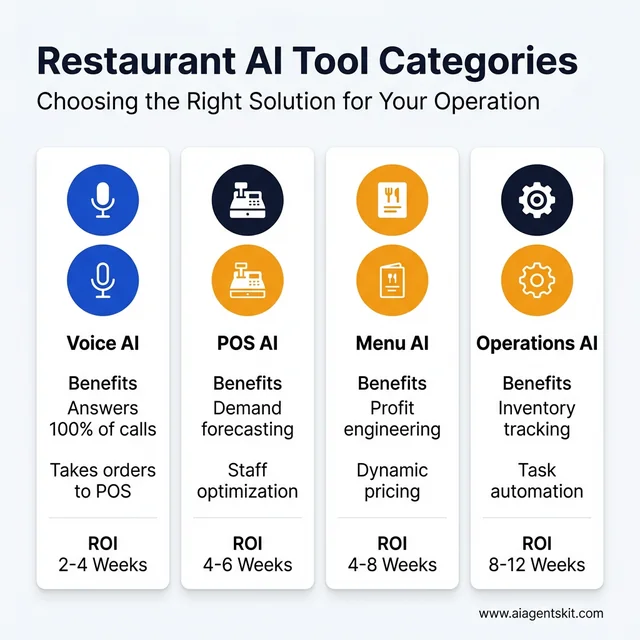
Comprehensive breakdown of Restaurant AI tool categories and their typical ROI timelines.
1. Voice AI / Phone Answering
Loman AI (~$199/month)
- What it does: AI phone agent that answers calls, takes orders, handles reservations
- Best for: Restaurants with high call volume for takeout/delivery
- Why it works: Integrates with Square, Toast, Clover. Orders go straight to your POS without manual entry.
- The catch: Works best with straightforward menus. If you have 200 items with complex customizations, it might struggle.
Certus AI (custom pricing)
- What it does: Voice AI focused specifically on phone ordering
- Best for: Quick service and fast casual
- Why it works: 91% order accuracy rate according to industry data. Handles multiple callers simultaneously.
- Pricing varies based on call volume, but typically $150-300/month for small operations.
Yelp Host & Receptionist (Yelp integrated)
- What it does: AI receptionist through Yelp’s platform
- Best for: Restaurants already using Yelp for reservations/reviews
- Why it works: Manages bookings, provides wait times, sends follow-up texts
- Pricing: Bundled with Yelp for Business (varies by market)
2. POS Integration
Aireus POS (AI features included)
- What it does: Full POS system with built-in AI forecasting
- Best for: Restaurants wanting an all-in-one solution
- Key AI features: Demand prediction, automatic reorder suggestions, labor optimization
- Cost: $69-149/month depending on features
Toast AI Add-ons (existing Toast users)
- What it does: Adds AI capabilities to your existing Toast system
- Features: Sales forecasting, menu performance analytics, guest insights
- Best for: Restaurants already on Toast who want to add intelligence. According to Toast’s 2025 financial reports, they now serve over 164,000 restaurant locations.
- Cost: $50-100/month add-on
Square for Restaurants AI
- What it does: AI features built into Square’s restaurant platform
- Features: Inventory forecasting, sales predictions, staff optimization
- Best for: Small restaurants already using Square
- Cost: Included in higher-tier plans ($165/month+)
3. Menu Optimization
Restaurant365 ($299-499/month)
- What it does: Full restaurant management with AI-powered menu engineering
- Best for: Growing restaurants ready for comprehensive tools
- Key feature: Analyzes your sales mix and food costs to identify your “stars” (high profit, high popularity) and “dogs” (low profit, low popularity)
- The insight: Most restaurants have 2-3 items driving 40% of their profit and 10 items losing money they don’t realize
Checkmate ($150-300/month)
- What it does: Dynamic menu optimization and pricing
- Best for: Restaurants wanting to test menu changes without printing new menus
- Feature: Digital menu boards that adjust pricing based on demand, time of day, or inventory levels
Popmenu ($199-399/month)
- What it does: AI-driven online menu display and customer engagement
- Best for: Restaurants focused on online presence and SEO
- Feature: Menus that update automatically based on availability, plus AI writing for descriptions
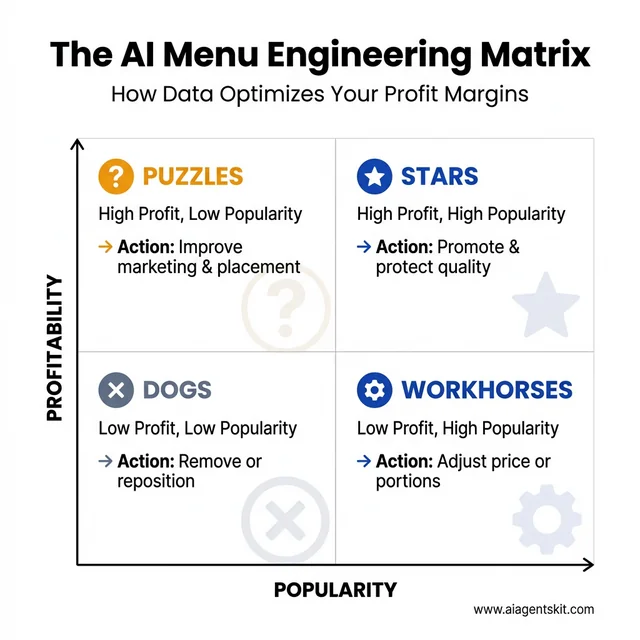
The AI Menu Engineering Matrix: A data-driven framework for optimizing menu profitability and popularity.
4. Operations & Forecasting
Fourth iQ (custom pricing, typically $200-500/month)
- What it does: AI forecasting for labor and inventory
- Best for: Multi-location or high-volume single locations
- Features: Predictive scheduling, automated purchasing, waste reduction analytics
- ROI claim: Users report 15-20% reduction in labor costs through better scheduling
Xenia ($99-249/month)
- What it does: Operations automation and task management with AI insights
- Best for: Restaurants wanting to standardize operations across shifts
- Feature: AI identifies patterns in your operations—like which prep tasks consistently run behind—and suggests workflow improvements
If you’re interested in how AI can automate online ordering and customer service, see our guide on AI agents for e-commerce automation.
How Much Does AI Cost for Small Restaurants?
Let me be straight with you: AI isn’t free. But it’s also not the $10,000+ enterprise software it used to be. Here’s the real cost breakdown for small restaurants in 2026.
Budget Tier: $0-100/month
Start here if you’re curious but cautious.
- Square/T Toast AI features: Often included in your existing plan or $50-100/month add-on
- ChatGPT for restaurants: Use it to write menu descriptions, respond to reviews, draft social media ($20/month for Plus)
- Free inventory apps with AI: Basic forecasting in apps like BlueCart (free tier) or MarketMan
Growth Tier: $100-300/month
This is where most successful small restaurants land.
- Voice AI (Loman, Certus): $150-250/month
- Menu optimization (Checkmate): $150-200/month
- Comprehensive operations (Xenia): $99-249/month
For $200-300/month, you can solve your biggest pain point—usually phone answering or scheduling—and see measurable ROI within 4-8 weeks.
Comprehensive Tier: $300-500+/month
For restaurants ready to fully commit to AI-driven operations.
- Full management suite (Restaurant365, Fourth iQ): $299-499/month
- Multiple specialized tools: Voice AI + menu optimization + forecasting = $400-600/month
| Tool Type | Monthly Cost | Typical ROI Timeline | Best For |
|---|---|---|---|
| Voice AI | $150-250 | 2-4 weeks | High call volume, takeout focus |
| Menu AI | $100-200 | 4-8 weeks | Menu optimization, pricing |
| Labor AI | $100-200 | 4-6 weeks | Scheduling challenges |
| Full Suite | $300-500 | 8-12 weeks | Comprehensive transformation |
My honest take: Start with one tool in the $100-200 range. Solve your biggest pain point first. Don’t try to AI-ify everything at once—that’s how you end up overwhelmed and wondering why nothing’s working. Before you start, use our AI ROI calculator to estimate your potential return on investment. According to Deloitte’s AI research, restaurants implementing AI see measurable efficiency gains, with some achieving 15-20% reduction in labor costs through better scheduling and inventory optimization.
A note on hidden costs: Budget an extra 2-3 hours per week for the first month to learn the system and train staff. Also factor in potential POS upgrade costs if your current system doesn’t integrate well. Some restaurants find they need to upgrade from a basic POS to a restaurant-specific one (like Toast or Square for Restaurants) before adding AI, which could be an additional $100-200/month.
POS AI Integration: Making Your Systems Smarter
Here’s something most restaurant tech salespeople won’t tell you: your POS system is already collecting the data AI needs. The problem is, most POS systems don’t do anything intelligent with that data.
POS AI integration means connecting AI tools to your point-of-sale system so they can:
- Read your sales data in real-time
- Analyze patterns (what sells when, at what price points, with what modifications)
- Make predictions (how much chicken you’ll need next Tuesday)
- Trigger actions (automatically suggest reordering when inventory hits a threshold)
Which POS Systems Have Built-in AI?
Toast (one of the most popular restaurant POS systems) now offers:
- Sales forecasting based on historical data
- Menu performance analytics (which items make you money vs. just revenue)
- Guest insights and visit frequency tracking
Square for Restaurants includes:
- Inventory forecasting
- Automatic reorder suggestions
- Staff optimization recommendations
Aireus POS is built specifically with AI in mind:
- Predictive scheduling
- Dynamic menu pricing
- Waste reduction analytics
What If Your POS Doesn’t Have AI?
Most modern AI tools integrate with popular POS systems through APIs (technical connections). If you’re using Clover, Square, Toast, or most major systems, tools like Loman AI, Fourth iQ, or Restaurant365 can connect directly.
The integration usually takes 15-30 minutes and involves:
- Authorizing the AI tool to access your POS data
- Mapping your menu items between systems
- Setting up basic rules (when to reorder, how to categorize items)
Important caveat: If you’re using an older “dumb” POS system that doesn’t have API access, you’re limited. You might need to upgrade your POS before adding AI, or choose AI tools that work independently (like voice AI that doesn’t need POS integration).
The good news? 80% of restaurant executives plan to spend more on AI in the coming year according to TD Bank’s 2025 restaurant industry survey. Additionally, the National Restaurant Association reports that over 25% of restaurant operators are already using AI, with marketing and administrative tasks being the top implementation areas. Toast’s 2026 research shows 57% of restaurant guests are comfortable with restaurants using AI technology. This means POS companies are scrambling to add AI features. Even if your current system is limited, your next upgrade probably won’t be. For help planning your rollout, see our step-by-step AI implementation guide.
AI Menu Optimization: Data-Driven Decisions
Let me tell you about a pizza shop owner I know. He was proud of his 40-item menu—something for everyone, he thought. Then he ran it through an AI menu optimization tool and discovered that 12 of those items accounted for 85% of his profit. The other 28? Breaking even or losing money.
He cut his menu to 20 items, focused on making those stars exceptional, and saw his profit margin jump from 8% to 14% in three months. Same kitchen, same staff, better bottom line.
What AI Menu Optimization Actually Does
AI menu optimization tools analyze:
- Sales volume: What sells and when
- Food costs: Ingredient costs and portion calculations
- Preparation time: Labor cost per item
- Price elasticity: How demand changes when you adjust prices
- Cross-selling patterns: Which items people order together
The Menu Engineering Matrix
Most AI tools use a variation of the classic “menu engineering” matrix:
- Stars: High profit, high popularity (your money makers—promote these)
- Puzzles: High profit, low popularity (make them more visible or improve descriptions)
- Workhorses: Low profit, high popularity (slight price increases or portion adjustments)
- Dogs: Low profit, low popularity (consider removing or repositioning)
Dynamic Pricing in Action
Some advanced tools, like Checkmate, offer dynamic menu pricing. This means your digital menu boards or online ordering automatically adjust prices based on:
- Time of day: Happy hour pricing, lunch specials
- Demand levels: Surge pricing during peak times (controversial but increasingly common)
- Inventory status: Discount items you need to move before they spoil
I’ll be honest: I’m still conflicted about surge pricing for restaurants. It works for delivery apps, but customers might resent paying more just because it’s Saturday night. The data says it increases revenue, but the customer experience question is real. That’s the kind of nuance AI can’t solve—you have to decide your own approach.
Step-by-Step: Implementing AI in Your Restaurant
I’ve watched too many owners get excited about AI, buy three different tools at once, and end up frustrated when nothing works smoothly. Here’s the approach that actually succeeds.
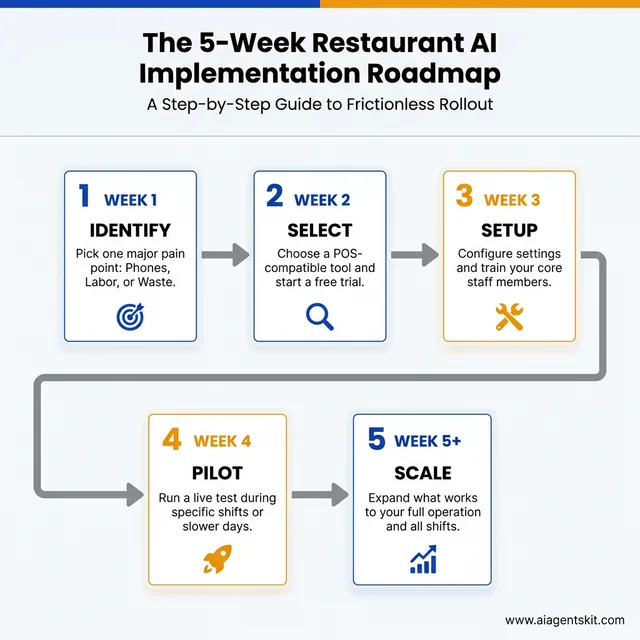
The 5-Week Restaurant AI Implementation Roadmap: A step-by-step strategy for successful rollout.
Week 1: Identify Your Biggest Pain Point
Don’t start with the coolest tool. Start with your biggest problem.
- Missing 30% of phone calls? → Start with voice AI
- Constantly overstaffed or understaffed? → Start with labor forecasting
- Throwing away food every week? → Start with inventory AI
- Not sure if your menu makes money? → Start with menu optimization
The rule: Pick ONE problem. Not two, not three. One.
Week 2: Choose the Right Tool
Match your problem to the tool category from earlier in this guide. Then:
- Check compatibility: Does it integrate with your POS? (Most list compatible systems on their website)
- Try before you buy: Most tools offer 14-day free trials. Use them.
- Start simple: Pick the basic plan. You can always upgrade later.
- Read small restaurant reviews: Look for reviews from operations your size, not just the enterprise case studies on their website
Week 3-4: Pilot and Measure
Don’t roll out AI to your entire operation on day one. That’s asking for chaos.
Pilot approach:
- Run the tool during specific shifts or days
- Train one or two key staff members thoroughly
- Track metrics before and after (missed calls, food waste dollars, labor hours)
- Get staff feedback daily
What to measure:
- Voice AI: Missed calls, order accuracy, average order value
- Labor AI: Labor cost percentage, customer wait times, staff overtime
- Inventory AI: Food cost percentage, waste dollars, stockouts
- Menu AI: Profit per item, items removed, customer feedback
Week 5+: Scale What Works
If the pilot shows positive results (usually 10%+ improvement in your key metric), expand it:
- Roll out to all shifts/days
- Train additional staff
- Add complementary tools if needed (voice AI + menu optimization work well together)
If it doesn’t work, cancel before the trial ends and try a different tool or approach. The beauty of modern SaaS tools is you’re not locked into year-long contracts.
Pro tip: Give it at least 4 weeks before judging success. AI needs time to learn your patterns. The first week might actually feel worse as the system adapts to your operation.
Common Mistakes to Avoid
After talking to dozens of restaurant owners about their AI implementations, here are the mistakes I see most often:
Trying to Implement Everything at Once
The owner who buys voice AI, menu optimization, inventory management, and a new POS system simultaneously is setting themselves up for failure. Each tool needs attention, training, and tweaking. Do one well before adding another.
Ignoring Staff Buy-In
Your staff will determine whether AI succeeds or fails. If they see it as “the robot taking our jobs,” they’ll sabotage it (intentionally or not). If they see it as “the tool that helps me do my job better,” they’ll make it work.
Involve key staff in the selection process. Show them how it helps them, not just you. For example: “This voice AI means you won’t have to answer the phone while you’re running food.”
Choosing Tools That Don’t Integrate
Nothing’s worse than having voice AI take an order, then someone has to manually type it into the POS. Before buying any tool, verify it integrates with your existing systems. Most vendors list integrations on their website—if they don’t list your POS, email and ask before committing.
Expecting Instant ROI
AI needs data to work well. In week one, voice AI might misunderstand orders. In week two, it gets better. By week four, it’s often more accurate than human staff.
Give it 4-8 weeks before making a final judgment. Most tools get significantly better as they learn your specific menu, customer accents, and order patterns.
Forgetting the Human Element
Here’s my hot take: AI won’t replace restaurant workers. But restaurants that use AI effectively will replace restaurants that don’t.
The goal isn’t to automate hospitality—that’s an oxymoron. The goal is to automate the administrative chaos (answering phones, scheduling, inventory tracking) so your humans can focus on what humans do best: creating memorable experiences, solving unique problems, and making guests feel welcome.
AI by Restaurant Type: What Works Best for You
Not all restaurants have the same needs. Here’s how AI applies to specific restaurant types:
AI for Pizzerias
Pizzerias deal with high call volumes, complex customization requests, and delivery coordination. The best AI tools for pizza shops include:
- Voice AI for phone orders: Handles “half pepperoni, half mushrooms, well-done crust” without confusion
- Delivery route optimization: AI that groups orders by neighborhood to minimize delivery times
- Predictive prep: Forecasts how much dough to prep based on day of week, weather, and local events
AI for Cafes and Coffee Shops
Cafes need speed during morning rushes and accurate inventory for perishables:
- Mobile ordering AI: Predicts prep times so customers arrive when their order is ready
- Milk and pastry forecasting: Tracks which pastries sell out by 10 AM vs 2 PM
- Staff scheduling: Accounts for the dramatic difference between weekday and weekend patterns
AI for Food Trucks
Food trucks face unique challenges—limited space, variable locations, and weather dependency:
- Location-based demand forecasting: Predicts sales at different spots based on day, weather, and local events
- Inventory optimization for small spaces: Ensures you don’t waste precious storage on slow-moving items
- Social media AI: Auto-posts your location and daily specials to Instagram and Twitter
AI for Bakeries
Bakeries work with highly perishable inventory and early morning prep:
- Production planning AI: Predicts exactly how many croissants, muffins, and loaves to bake
- Pre-order management: Handles custom cake orders and pickup scheduling
- Waste reduction: Tracks which items get tossed at end of day and adjusts production
AI for Bars and Nightlife
Bars need help with inventory tracking and staff management during unpredictable rushes:
- Pour cost analytics: Tracks exactly how much liquor you’re using vs selling
- Dynamic staffing: Predicts busy nights based on local events, weather, and holidays
- Reservation management: AI handles table bookings and VIP guest preferences
To see how different industries apply AI automation, check out our comprehensive guide on AI use cases by industry.
AI for Restaurant Marketing and Online Presence
Most restaurant owners focus AI on operations, but marketing AI can drive new customers:
Review Management AI
Tools like BirdEye and Podium use AI to:
- Monitor reviews across Google, Yelp, TripAdvisor, and Facebook in one dashboard
- Generate suggested responses to reviews (positive and negative)
- Identify common complaints before they become trends
- Alert you to reviews that need immediate attention
The key benefit: Responding to reviews within 24 hours increases customer retention. According to industry research, restaurants using AI for sentiment analysis on reviews have improved response times and raised Net Promoter Scores by 18 points. AI helps you do this consistently without spending hours monitoring multiple platforms.
Social Media AI
Buffer AI and Hootsuite AI can:
- Write Instagram captions featuring your daily specials
- Suggest optimal posting times based on when your followers are active
- Generate hashtag recommendations for food posts
- Create simple video content from photos
Email Marketing AI
Tools like Mailchimp AI and Klaviyo offer:
- Automated welcome sequences for new newsletter subscribers
- Personalized recommendations based on past orders
- A/B testing for subject lines and content
- Predictive sending (emails arrive when each customer is most likely to open them)
AI Reservation and Table Management Systems
Modern reservation AI goes beyond simple booking:
Smart Reservation Features
- Table optimization: AI arranges reservations to maximize seating capacity without overbooking
- No-show prediction: Identifies reservation patterns that predict no-shows (first-time bookers, large parties, holiday weekends)
- Waitlist management: Automatically texts waitlisted guests when tables open
- Guest preference tracking: Remembers that table 12 is Mrs. Johnson’s favorite and Mr. Chen is allergic to shellfish
Popular Options
OpenTable AI: The industry standard with AI-powered seating optimization and guest insights Resy: Focuses on high-end dining with intelligent waitlist and guest recognition Tock: Prepaid reservations reduce no-shows; AI optimizes tasting menu timing
Kitchen Display Systems and Back-of-House AI
The kitchen is where AI can reduce chaos and improve ticket times:
Kitchen Display System (KDS) AI
Modern KDS platforms like Aireus and Toast KDS use AI to:
- Prioritize tickets intelligently: Bumping up apps and salads while proteins cook
- Prep time prediction: Tells the front of house exactly when table 12’s food will be ready
- Bumping logic: Suggests when to fire specific items so everything hits the pass simultaneously
- Error detection: Flags tickets with unusual modifications that might be mistakes
Recipe Management AI
Meez and Galley Solutions offer:
- Recipe costing that updates automatically when ingredient prices change
- Scaling calculations for catering orders
- Prep list generation based on predicted sales
- Allergen tracking and cross-contamination alerts
Restaurant Business Intelligence and Predictive Analytics
For data-driven restaurant owners, business intelligence tools provide insights:
What Restaurant BI Tools Analyze
- Sales trends by hour, day, and season: Spot patterns invisible to daily operations
- Labor efficiency ratios: Revenue per labor hour across shifts
- Menu item profitability: True costs including labor, not just food costs
- Customer lifetime value: Which guests return most often and spend the most
- Benchmarking: How your metrics compare to similar restaurants in your area
Popular Restaurant Analytics Platforms
Restaurant365: Full BI suite with forecasting and accounting integration Tenzo: Real-time analytics that pull data from your POS, labor, and inventory systems 4R: Demand forecasting focused specifically on reducing food waste
Building Your Restaurant AI Technology Stack
Most successful small restaurants use 2-4 AI tools working together. Here’s how to think about your tech stack:
The Essential Stack (Budget: $200-400/month)
- POS with AI features (Toast, Square, or Aireus) - $69-165/month
- Voice AI for phone orders (Loman or Certus) - $150-200/month
- Review management (Podium or BirdEye) - $50-150/month
The Growth Stack (Budget: $400-700/month)
Add to the essential stack: 4. Labor forecasting (Fourth iQ or Xenia) - $100-200/month 5. Menu optimization (Restaurant365 or Checkmate) - $150-300/month
The Premium Stack (Budget: $700-1,000+/month)
For restaurants ready to fully commit: 6. Reservation AI (OpenTable with AI features) - $200-400/month 7. Advanced analytics (Tenzo or custom BI) - $150-300/month
Quick-Start AI Implementation Checklist
Use this checklist to get started without overwhelm:
Week 1: Assessment
- Identify your biggest time waster (phones, scheduling, inventory)
- List your current POS and software
- Check which AI features you already have (many are included in modern POS)
- Set a budget ($100-300 for first tool)
Week 2: Selection
- Research 2-3 tools that solve your #1 problem
- Verify integration with your POS
- Sign up for free trials
- Test with real scenarios (place test orders, try the interface)
Week 3: Setup
- Choose your tool and purchase
- Complete initial configuration
- Train 1-2 key staff members
- Create simple documentation for your team
Week 4: Launch
- Go live during slower shifts first
- Monitor closely and collect feedback
- Track your key metric (missed calls, labor hours, waste)
- Adjust settings based on what you learn
Month 2: Optimize
- Review performance data
- Expand usage to all shifts
- Train remaining staff
- Consider adding complementary tools
Frequently Asked Questions
Will AI replace restaurant workers?
No. AI handles repetitive, predictable tasks—answering the same questions, taking standard orders, predicting staffing needs. It doesn’t replace the human judgment, creativity, and warmth that make restaurants special. As the National Restaurant Association confirms, “AI isn’t here to replace restaurant workers—it’s helping them work smarter.” In fact, by handling the busywork, AI often lets staff focus more on guests. The restaurants I see succeeding use AI to augment their team, not replace it.
How do I get started with AI if I’m not tech-savvy?
Start with tools specifically designed for restaurants, not generic AI platforms. Look for tools that advertise “no IT team required” or “15-minute setup.” Most modern restaurant AI tools have onboarding specialists who’ll walk you through setup over a video call. If a tool requires you to write code or configure APIs yourself, it’s not built for small restaurants—move on to the next option.
What’s the minimum budget needed to start?
You can start with AI features already in your POS system (Square, Toast) for $0-50/month. If you want standalone AI tools, budget $150-200/month for your first tool. The ROI on voice AI or labor forecasting typically pays for itself within 4-8 weeks for most small restaurants.
Can AI really reduce food waste?
Yes. AI inventory tools analyze your actual usage patterns and predict demand more accurately than human intuition (which tends to over-order “just in case”). According to industry research, restaurants using AI inventory management typically see 20-40% reduction in food waste within the first month. One pizza shop owner I know cut his produce waste by 60% after switching to AI-driven ordering. This aligns with ReFED’s findings that food waste reduction is a top priority for foodservice operators in 2026.
How long until I see ROI?
It depends on the tool and your starting point:
- Voice AI: 2-4 weeks (immediate reduction in missed calls)
- Labor AI: 4-6 weeks (optimization takes time to fine-tune)
- Inventory AI: 4-8 weeks (need ordering cycles to see impact)
- Menu AI: 4-12 weeks (depends on how quickly you implement recommendations)
Give any tool at least 30 days before judging it. AI needs time to learn your patterns.
Is my restaurant too small for AI?
If you have a POS system and at least $500,000 in annual revenue, you’re not too small. In fact, small restaurants often see bigger percentage improvements because they’re starting from a less optimized baseline. A 10% efficiency gain means more to a restaurant with 2% margins than one with 10% margins.
What if I already have a POS system—can I still use AI?
Usually yes. Most AI tools integrate with popular POS systems (Square, Toast, Clover, Aloha). Check the AI tool’s website for a list of integrations, or email their support with your POS system name. If your POS is very old or obscure, you might be limited to standalone AI tools (like voice AI that works independently) until you upgrade your POS.
What are the best AI tools for a pizzeria specifically?
Pizzerias need voice AI that handles complex customizations, delivery route optimization, and dough prep forecasting. The best combination is usually Loman AI for phone orders ($199/month) paired with your POS’s forecasting features. For delivery-focused pizzerias, add OptimoRoute for AI-powered delivery sequencing.
Can AI help with restaurant review management?
Yes. Tools like BirdEye and Podium use AI to monitor reviews across all platforms (Google, Yelp, TripAdvisor), generate suggested responses, and identify trending complaints before they hurt your reputation. Most cost $100-200/month and integrate with your POS to understand customer history when responding.
What’s the difference between AI forecasting and traditional POS reports?
Traditional POS reports show what happened yesterday. AI forecasting predicts what will happen tomorrow using machine learning that analyzes patterns across sales history, weather, local events, and seasonality. The difference is actionable predictions vs historical data.
Do I need a kitchen display system (KDS) with AI?
If your kitchen currently uses paper tickets or a basic KDS, upgrading to an AI-powered KDS can reduce ticket times by 15-20% through intelligent prioritization. Toast KDS and Aireus both offer AI features that optimize firing times and alert you to potential errors.
Can AI help with restaurant marketing?
Absolutely. AI marketing tools can write social media captions, suggest optimal posting times, generate email campaigns, and even create simple videos from photos. Buffer AI, Hootsuite AI, and Mailchimp’s AI features are affordable entry points ($20-100/month).
What’s predictive analytics for restaurants?
Predictive analytics uses historical data to forecast future outcomes. For restaurants, this means predicting sales volume, optimal staffing levels, inventory needs, and even which menu items will trend. It’s the core technology behind most restaurant AI tools.
Is AI worth it for a food truck?
Yes, especially for demand forecasting and location optimization. Food trucks have unique challenges—limited storage, variable locations, weather dependency. AI helps predict which locations will be busiest and how much inventory to stock for each spot.
How does AI handle restaurant reservations?
AI reservation systems like OpenTable and Resy optimize table arrangements to maximize seating, predict no-shows based on booking patterns, manage waitlists automatically, and remember guest preferences. This increases table turns and reduces empty seats during peak hours.
Conclusion
Here’s what I want you to remember: AI for small restaurants isn’t science fiction anymore. It’s practical, affordable tools that solve real problems you face every day.
You don’t need to become a tech company. You don’t need to replace your staff. You just need to pick one pain point—probably missed calls, chaotic scheduling, or mystery food waste—and try one tool for 30 days.
The restaurants that are winning in 2026 aren’t the ones with the fanciest technology. They’re the ones using simple AI tools and restaurant productivity software to eliminate the chaos, freeing up their humans to do what humans do best: create great food and memorable experiences.
Your competitors down the street might already be using these tools. The question isn’t whether AI will change restaurant operations—it’s whether you’ll be ahead of the curve or playing catch-up.
My recommendation: Pick one tool from this guide. Start a free trial this week. Give it 30 days. Track one metric (missed calls, labor hours, waste dollars). See what happens.
Worst case? You cancel and go back to how things were. Best case? You free up 10 hours a week, capture thousands in lost revenue, and wonder why you didn’t start sooner.
For customer service automation specifically, see our AI customer service implementation guide.
The future of small restaurants isn’t about being bigger—it’s about being smarter. And these tools make that accessible to everyone, not just the chains with corporate budgets.