AI for Teachers: Save Time Without Losing the Human Touch
How K-12 teachers use AI to save 5-9 hours weekly in 2026. Practical tools, ChatGPT prompts, lesson planning, grading, classroom management, IEP goals, and teacher burnout strategies.
Something remarkable is happening in teacher workrooms across the country. Educators who once spent three hours on Sunday night lesson planning are finishing in under an hour—and reporting that the quality hasn’t dropped. The shift isn’t coming from admin mandates or district-wide rollouts. It’s coming from teachers quietly discovering that AI for teachers isn’t about replacing anything. It’s about reclaiming time.
The numbers bear this out. The global AI EdTech market reached $32.7 billion in 2025, and teacher adoption has accelerated sharply—53% of teachers now use AI at work, a jump of more than 15 percentage points in under two years. Research from the broader landscape of AI in education shows this pattern is widespread enough to study systematically. The practical question for most teachers isn’t whether to explore generative AI tools—it’s how to start without getting overwhelmed by options or contributing to an already exhausting workload.
This guide covers the tools teachers are actually using in 2026, the specific workflows where AI delivers clear time savings—lesson planning, grading, classroom management, IEP documentation, and parent communication—and the honest limitations that matter before any educator clicks “sign up.”
What Does AI Actually Do for Teachers in the Classroom?
The most useful frame for understanding AI in education isn’t “what can AI do?” It’s “what would teachers rather hand off?”
According to the Gallup and Walton Family Foundation’s 2025 K-12 Teacher Research, teachers who use AI weekly save an average of 5.9 hours per week—equivalent to roughly six full weeks of time returned over a school year. A separate analysis from McKinsey & Company’s education research suggests AI-enabled automation could free 20% to 40% of a typical teacher’s 50-hour workweek, or up to 13 hours per week in high-adoption scenarios.
Those numbers become more concrete when broken into categories.
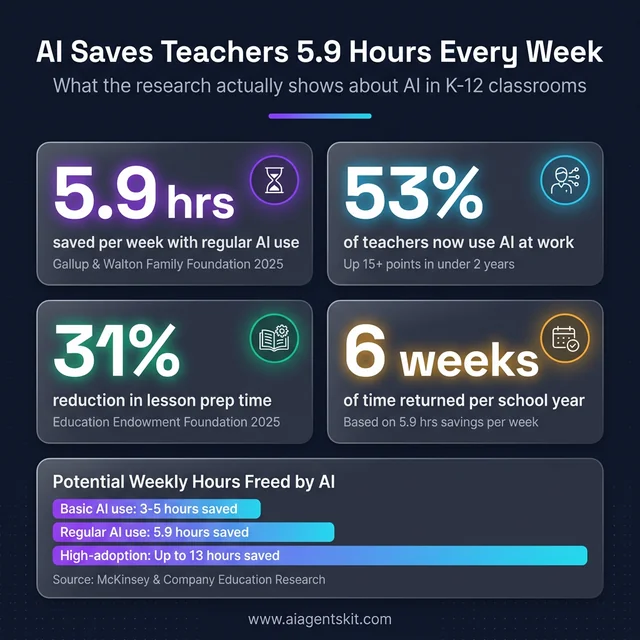
Key AI time-savings statistics for K-12 teachers in 2026. Sources: Gallup & Walton Family Foundation, Education Endowment Foundation, McKinsey & Company.
What AI handles exceptionally well:
- Generating first drafts of lesson plans, rubrics, and assessments aligned to specific standards
- Creating differentiated versions of materials at multiple reading levels simultaneously
- Drafting parent communications and newsletters in appropriate tones
- Providing formative feedback on student writing at scale
- Administrative documentation, including IEP goal drafts and progress note starters
What AI cannot replace:
- The relationship between a teacher and a student who’s struggling
- Classroom community and the social fabric of learning
- Emotional support during difficult moments
- Judgment calls that require knowing a particular child’s circumstances
- Inspiring curiosity and sustaining motivation over time
The teachers getting the most out of AI consistently follow a “human leads, AI assists” model. They use AI to compress the information-processing work—generating, organizing, reviewing—so more time and attention flows toward the irreplaceable human work. Among the best AI tools available today, a growing category is designed specifically with this teacher-centric model in mind.
The Time Equation That Makes AI Worth the Learning Curve
Most teachers work 50-plus hours per week despite 37-hour contracts. Research tracking teacher time consistently shows that direct instruction accounts for only 40-50% of the total time worked. The remaining hours flow into planning, grading, documentation, communication with families, and administrative compliance—work that never ends and rarely appears on a public-facing job description.
AI doesn’t add hours to the day. It reduces the cost of information-heavy tasks enough to return chunks of time that teachers can reuse. AI-generated materials require editing rather than creation from scratch. That shift alone—from blank page to revision—returns meaningful time in most cases.
The learning curve is real: most teachers report an adjustment period of 3-6 weeks before AI-assisted workflows become faster than their previous approach. During that window, output quality often feels inconsistent and prompt experimentation takes time. What most experienced AI-using teachers observe in retrospect is that the early friction was worth tolerating—the compounding benefit across a full school year is substantial. Districts that provide structured onboarding and shared prompt libraries reduce this adjustment period significantly.
8 Best AI Tools for Teachers in 2026
The education AI tools landscape has matured significantly. What follows isn’t a comprehensive inventory—it’s a functional guide to the platforms that have earned sustained teacher trust.
MagicSchool AI: The All-in-One Educator Platform
MagicSchool AI was built from the ground up for K-12 classrooms, and the difference is evident in the output. Unlike general AI assistants that require significant prompt engineering to produce classroom-relevant materials, MagicSchool understands educator contexts by default.
The platform offers more than 80 tools covering lesson planning, standards alignment, rubric generation, differentiated materials, parent newsletters, accommodation support, and IEP documentation starters. Platform data indicates teachers save 7-10 hours per week with regular use—a believable range given the breadth of the toolset.
Specific time data backs up the value: MagicSchool reduces lesson plan creation from 25-30 minutes to approximately 8 minutes, and rubric writing from 20+ minutes to about 5 minutes. A free tier is available for individual teachers; district-level pricing covers full access.
Khanmigo: Free AI Tutoring and Planning Tool
Khanmigo, developed by Khan Academy, functions as both a student-facing tutor and a teacher planning assistant. Its philosophy is notable: the AI guides students toward answers through Socratic questioning rather than providing the answer directly—a design choice that addresses academic integrity concerns at the platform level.
For teachers, Khanmigo generates lesson plans, rubrics, exit tickets, grouping strategies, multilingual newsletters, and differentiated task sets. Teacher tools are available for free, making this one of the highest-value zero-cost options in the market. Integration with Khan Academy’s existing content library adds depth for teachers already using the platform.
Grading and Feedback Tools Worth Knowing
Gradescope (now part of Turnitin) handles large-volume assessment at scale. It auto-groups similar student responses, applies rubrics consistently across submissions, and flags potential academic integrity concerns. Effective for quizzes, exams, coding assignments, short-answer questions, and even handwritten work via photo upload.
Writable and Class Companion focus on written work. Both generate draft feedback comments aligned to rubrics that teachers can review, edit, and approve—turning a 45-minute grading session into a 15-minute review. For teachers with high writing volume (ELA, humanities, social studies), these tools represent the most time-sensitive ROI in the category.
Brisk Teaching takes a different architectural approach: it’s a Chrome extension that embeds directly into Google Docs, Slides, and Classroom. Rather than requiring a platform switch, Brisk adds AI capabilities to tools teachers already use. Text adjustment for reading level, rubric generation, slide creation from outlines, and comment suggestions are available without leaving the Google ecosystem.
Canva for Education includes AI assistance for creating visuals—worksheets, posters, presentations, and classroom materials. The AI suggests layouts, generates supporting imagery, and accelerates design work for teachers without graphic design experience.
Choosing the Right Tool for Your Specific Need
A common mistake educators make when starting with AI is installing multiple platforms simultaneously and expecting to integrate them all at once. The most effective adoption pattern, according to documented case studies, is starting with a single tool matched to the task that costs the most time.
For teachers who grind through lesson planning: MagicSchool AI or Khanmigo as an entry point. For teachers buried in writing feedback: Writable or Class Companion first. For teachers embedded in Google Classroom workflows: Brisk Teaching as a Chrome extension provides the lowest transition cost. For teachers managing IEP documentation: MagicSchool AI’s special education tools represent perhaps the single highest-ROI entry point in the category.
The tool choice matters less than the commitment to consistent use within one function long enough to internalize a faster workflow. Teachers who try a tool once and form a definitive opinion almost always underestimate the efficiency gains that come with repetition.
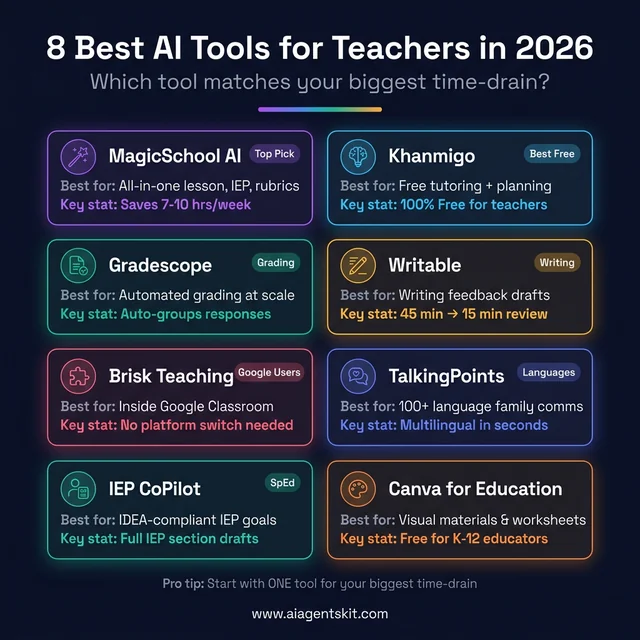
The 8 best AI tools for teachers in 2026, organized by primary use case. Start with the one that targets your biggest time-drain.
How AI for Lesson Planning Cuts Prep Time by 31%
The UK’s Education Endowment Foundation found in 2025 that AI tools reduced lesson preparation time by up to 31% for participating teachers—equating to approximately one full hour per week for a typical five-lesson planning load. For teachers running 25-30 hours of direct prep per week, even a 30% reduction reshapes workload considerably.
The mechanism isn’t magic. It’s that AI compresses the starting-from-scratch friction. Teachers don’t generate a lesson; they generate a first draft and edit it to match their students and style.
The 5-Step AI-Assisted Planning Workflow
Educators who have developed consistent AI-assisted planning routines typically follow a similar pattern:
- State the learning goal and constraints: Grade level, standard reference, time allotment, prior knowledge baseline
- Generate the structural outline: Ask AI for a lesson framework—hook, instruction, practice, assessment, closure—with activity ideas at each stage
- Develop materials: Request specific assets: discussion questions, graphic organizers, vocabulary scaffolds, or formative checks
- Differentiate simultaneously: Ask for 2-3 versions at different reading levels, or with additional scaffolding structures for struggling learners
- Review and customize: Edit for voice, student-specific context, and accuracy—this step typically takes 15-20 minutes regardless of AI output quality
The workflow shifts the teacher’s role from generator to editor. For experienced teachers, the editing step is where real professional judgment applies—which means AI actually intensifies the use of expertise rather than replacing it.
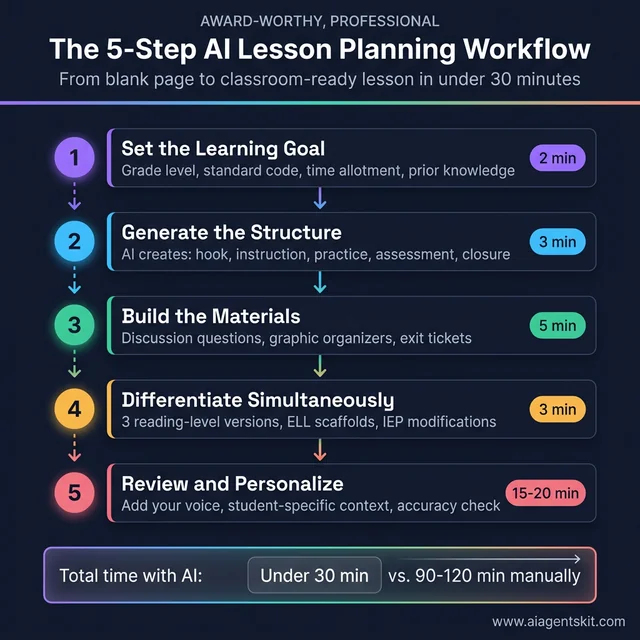
The 5-step AI-assisted lesson planning workflow. Each step builds on the last, cutting total prep time from 90-120 minutes to under 30.
The Prompt Formula That Changes Everything
Output quality correlates directly with input specificity. Vague prompts produce generic materials. Specific prompts produce usable first drafts.
Every effective teacher prompt follows the same backbone: subject + grade level + standard or objective + class context + constraints + output format. Each element you add narrows the AI’s guesswork and shifts output from generic to classroom-ready. Omit grade level and the AI defaults to adult content. Skip class context and there’s no differentiation built in. Leave out format and the output arrives as dense paragraph prose when a table was needed.
A complete library of copy-paste prompt templates organized by task—lesson planning, differentiation, assessment, grading, parent communication, and SpEd documentation—is available in the dedicated section below. Teachers who develop effective AI prompting skills consistently report better outputs than those using AI casually. The investment in learning prompt structure pays measurable dividends in materials quality.
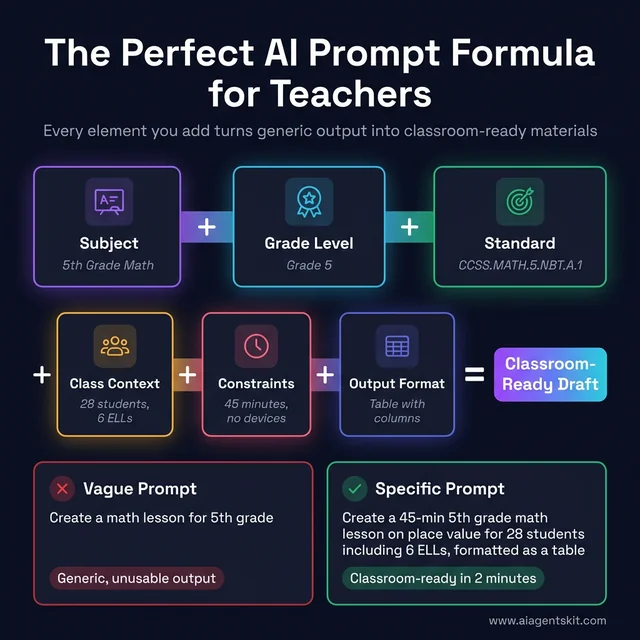
The 6-element AI prompt formula every teacher should know. Adding each element narrows the AI output from generic to classroom-ready.
How Teachers Use AI for Differentiated Instruction
Differentiated instruction has been the aspirational standard of good teaching for decades. The honest constraint has always been time—creating genuinely differentiated materials for 25-30 students with varying needs requires more hours than the day contains.
AI changes the constraint. Generating three reading-level versions of the same text passage, or producing scaffolded and extension versions of an assignment simultaneously, takes minutes rather than hours. Teachers who previously differentiated in theory can now differentiate in practice.
Reading level differentiation is the most immediate application. Paste a source text, specify the target Lexile range or grade level, and AI produces a version appropriate for struggling readers without altering the core content or intellectual demand. The same technique works in reverse for enrichment—adding nuance, complexity, or extension questions for advanced learners.
ELL support extends this further. AI can produce vocabulary glossaries, sentence frames for discussion participation, translated explanations of key concepts in students’ home languages, and scaffolded writing prompts that support participation while maintaining grade-level expectations.
Special education documentation benefits significantly. IEP goal drafting, present levels of performance writing, and progress monitoring note starters are time-intensive documentation tasks that AI handles with reasonable quality. Teachers verify accuracy, add student-specific context, and finalize—but the blank-page problem disappears.
Accommodation and modification generation extends AI’s value further for inclusion classrooms. Teachers managing 8-12 different accommodation plans simultaneously can use AI to rapidly generate modified versions of standard materials—chunked instructions, reduced answer choices, audio script text for text-to-speech, and visual supports—tailored to IEP specifications. The teacher still makes professional judgments about which supports serve each student; AI handles the materials production at a speed no individual teacher can match manually.
For teachers exploring how AI tools for student learning work in student-facing contexts, the same differentiation principles apply when students interact with AI directly for tutoring support. Several platforms, including Khanmigo, are specifically designed to ensure AI-supported student learning maintains rigorous standards rather than simply providing answers.
AI for Grading: Faster Feedback Without Losing Quality
Grading occupies more teacher time than any other task after direct instruction. AI assistance for grading operates in a narrower band than many teachers initially expect—but within that band, it delivers consistent value.
Objective assessment is where AI performs most reliably. Multiple-choice items, short-answer responses with clear correct answers, vocabulary definitions, and computational problems can be scored automatically with high accuracy. For this category, tools like Gradescope essentially eliminate per-item grading time.
Formative feedback on writing is more nuanced. AI-generated feedback comments—whether from Writable, Class Companion, or a general AI assistant—provide useful starting points but require teacher review. A teacher who accepts all AI feedback without reading it risks delivering generic or occasionally incorrect suggestions to students. The effective workflow is AI-drafts, teacher-edits: this reduces the time burden significantly while preserving the professional judgment that makes feedback meaningful.
Pattern recognition is an underappreciated AI advantage. When reviewing a full class set of responses, AI can identify common misconceptions, flag responses that appear inconsistent with a student’s prior work, and group similar errors for more efficient whole-class feedback. This analytical layer helps teachers make instructional decisions—which concepts need re-teaching—faster than reviewing individual papers allows.
Teachers should approach AI grading tools with calibrated expectations about AI bias and accuracy concerns. AI feedback tools may reflect biases in their training data, which can disadvantage certain writing styles, dialects, or cultural frameworks. Reviewing AI output critically—rather than accepting it wholesale—is a professional responsibility, not an optional extra.
AI for Report Card Comments: Faster Without Sounding Like a Robot
Report card season is one of the most time-compressed moments in the school year. Writing 25-35 individualized comments that are specific, professional, and meaningfully different from each other can consume 4-6 hours per marking period—and that’s before editing.
AI changes the starting point. Instead of writing from scratch, teachers input a student’s name, key performance observations (strengths, growth areas, specific skills), and tone preference, and receive 3-4 comment drafts to choose from and edit. MagicSchool AI’s Report Card Comments generator, ReportCards.ai, and Galaxy.ai are purpose-built for this workflow.
The critical step is specificity in the input prompt: “Ayesha has strong analytical skills, struggles with organizing written arguments, is very kind to classmates, and has improved significantly in reading fluency this quarter” produces a far more usable draft than “average student, some growth.”
Time savings are substantial: a task that consumed 30-45 minutes can become a 5-8 minute review cycle. The professional responsibility doesn’t change—final language is always the teacher’s—but the blank-page burden disappears entirely.
AI for Parent Communication: Multilingual Newsletters in Under 3 Minutes
Parent communication is time-intensive in proportion to its frequency. Weekly newsletters, conference invitation emails, individual concern messages, and progress updates each require appropriate tone calibration—which means they can’t simply be templated.
AI addresses this gap efficiently. Teachers paste a bullet-point summary of content into MagicSchool AI, ChatGPT, or TalkingPoints (a platform specifically designed for family communication) and receive a polished, appropriately toned draft in under a minute. For multilingual school communities, some platforms translate communications into 100+ home languages automatically—a capability that previously required district translation services or personal bilingual contacts.
Practical use cases with high teacher uptake:
- Weekly class newsletters: draft from bullet points in under 2 minutes
- Conference invitations: professional, warm, and clear—drafted in 30 seconds
- Concern flagging emails: AI helps strike the right balance between supportive and direct, especially for sensitive topics
- Celebration messages: quick, specific positive notes that families appreciate but that consume real time at volume
The same transparency principle applies: AI drafts, teacher personalizes and sends. The student-specific detail (“Jaylen specifically…” not “a student in my class…”) always comes from the teacher.
How AI Supports Classroom Management Without Replacing Your Judgment
Classroom management is the domain teachers ask about least—and need help with most. The assumption is that management is pure relationship and presence, which AI can’t touch. That’s partially true. What AI can genuinely help with is the infrastructure of classroom management: routines, documentation, behavior support planning, and student engagement monitoring.
AI for Behavior Documentation and Intervention Plans
Behavior incident documentation is one of the most time-consuming administrative tasks teachers face, particularly in inclusion settings. AI tools like SchoolAI and MagicSchool AI’s behavior intervention support can generate draft behavior intervention plans (BIPs) based on described behaviors, antecedents, and current support strategies. Teachers provide the context; AI produces a structured starting framework that complies with common documentation standards.
Specific workflow that’s gaining traction:
- Teacher describes the behavior pattern, triggers, and current responses in a brief paragraph
- AI generates a draft BIP with: behavior definition, function hypothesis, preventive strategies, replacement behaviors, and consequence plan
- Special education team reviews, student-specific context is layered in, and the plan is finalized
For schools with limited access to behavior specialists, this workflow makes professional-quality documentation more accessible—though it should always be reviewed by qualified personnel before implementation.
AI for Student Engagement: From Exit Tickets to Choice Boards
Student engagement drops when tasks feel disconnected or repetitive. AI helps teachers rapidly generate variety without building everything from scratch.
High-engagement materials teachers create in minutes with AI:
- Choice boards — AI generates 6-9 activity options at varying complexity levels covering the same learning objective
- Discussion starters and Socratic questions — tailored to specific texts or topics, with multiple Bloom’s taxonomy levels
- Gamified review activities — AI generates content for platforms like Quizizz or Gimkit, which teachers import directly
- Exit ticket variations — instead of the same 3-question format every time, AI produces quick alternatives: ranking, drawing prompts, one-sentence summaries, error identification
Engagement tools don’t require dedicated platforms. A teacher with ChatGPT, MagicSchool AI, or Google Gemini can generate a full week of varied formative check-ins in under 10 minutes.
AI-Assisted Classroom Routines and Pacing
AI excels at helping teachers design explicit routines—the kind that, when taught consistently, significantly reduce transition time and off-task behavior. Teachers can use AI to generate:
- Bell-ringer activity sequences for an entire unit (30 days of 3-minute starters)
- Step-by-step procedure checklists for complex tasks (lab setup, research projects, peer review)
- Pacing guide adjustments when a unit runs long or short—AI recalculates time allocations across remaining lessons
- Substitute teacher plans that provide enough structure for instructional continuity during absences
One practical caution: AI-generated classroom monitoring tools that analyze student behavior in real time (some LMS-integrated features) raise important equity and surveillance concerns. The productive use of AI for classroom management centers on supporting students, not surveilling them. School communities benefit from explicit policy discussions before deploying monitoring-focused tools.
AI by Subject Area: Tools That Fit Each Classroom
AI’s value varies significantly by subject area. Understanding where AI is genuinely useful versus where it requires more teacher scaffolding helps educators deploy it more strategically.
ELA: Writing, Reading, and Literature Analysis
English language arts teachers find the most immediate AI value in writing instruction and reading support. AI can generate:
- Writing prompts calibrated to specific genres, themes, or skill levels
- Model texts at multiple quality levels—showing students the continuum from emerging to proficient writing
- Detailed feedback drafts on argumentative structure, evidence use, and voice
- Vocabulary activities built directly from assigned reading passages
- Discussion questions at different Bloom’s levels for the same text
Literature analysis support includes historical context summaries, thematic analysis frameworks, and essay outline structures—useful for introducing complex texts, though teachers should verify any historical claims AI generates, as hallucination risk is non-trivial for specific historical details.
Math: Problem Generation and Concept Explanation
Mathematics teachers leverage AI primarily for differentiated problem generation and multi-pathway explanations.
AI generates practice problem sets aligned to specific skills at varying difficulty levels—valuable for creating differentiated homework or in-class practice without manually constructing every item. For word problems, AI can produce multiple scenarios using the same mathematical structure, giving students variety without teachers building from scratch.
Explanation support is where AI earns consistent praise from math teachers. When a student doesn’t understand a concept after the initial explanation, AI can produce alternative framings—visual representations, analogies, step-by-step worked examples—faster than a teacher can in the moment of instruction.
Science: Lab Support and Inquiry-Based Learning
Science teachers use AI for lab documentation scaffolding, safety protocol summaries, and inquiry question development.
AI-generated lab procedure templates, data analysis guidance documents, and conclusion-writing frames reduce the documentation burden that can crowd out actual scientific investigation. For inquiry-based learning, AI helps generate investigation questions at appropriate complexity levels and scaffolds the hypothesis-to-conclusion thinking chain.
One important caution: AI-generated claims about specific scientific phenomena should be verified against curriculum-aligned sources before sharing with students. AI performs well on explanatory frameworks but less reliably on precise factual details.
Social Studies and Special Education Classrooms
History and social studies teachers use AI for primary source analysis support, current events summarization at appropriate reading levels, multiple-perspective discussion frameworks, and debate preparation materials.
For history specifically, AI excels at generating structured document analysis guides (HAPP, SOAPS, or custom frameworks), creating comparative timelines, producing reading-level adaptations of primary sources while preserving key vocabulary, and developing Socratic seminar question sets that address multiple perspectives simultaneously. A single primary document can yield differentiated analysis scaffolds, background context explainers, and discussion protocols—materials that previously required a full planning session to produce.
Arts and Physical Education teachers represent an underserved use case that’s beginning to emerge. Music teachers use AI to generate listening guides, composition scaffolds, and music theory exercises. PE teachers apply AI to create unit plans, fitness assessment rubrics, and health literacy reading materials at appropriate grade levels—administrative work that previously fell entirely outside available planning support.
AI for IEP Goals, PLAAFP Writing, and Special Education Documentation
For special education teachers, the documentation burden is categorically different from other roles. A case manager with 18 students on IEPs can spend 15-20 hours per year on IEP goal writing alone—before accounting for PLAAFP drafting, BIPs, progress monitoring reports, and accommodation matrices. AI addresses this directly.
IEP goal generation is where AI shines most clearly. Teachers input: student’s disability category, grade level, academic domain (reading fluency, math calculation, written expression, etc.), current performance level, and the goal timeframe. AI generates multiple SMART goals with measurable benchmarks and suggested baseline data collection formats. MagicSchool AI’s IEP goal generator, Playground IEP (IEP CoPilot), and Monsha.ai are the most-used dedicated tools in this category.
PLAAFP (Present Levels of Academic Achievement and Functional Performance) writing benefits from a similar approach. Teachers paste in assessment scores, qualitative observations, teacher notes, and prior performance data—AI drafts a cohesive present levels narrative that meets IDEA structural requirements. The teacher adds student-specific context and reviews for accuracy before including in the formal document.
Social story creation for neurodivergent students—a personalized narrative that helps students understand and prepare for specific social situations—previously required significant customization time. AI generates a first draft in seconds when given: student name, the social situation, desired behavioral response, and sensory or communication preferences.
AI-generated IEP documents require educator review for accuracy, student specificity, and legal compliance. IDEA mandates that IEPs reflect individualized needs—AI produces frameworks, never final documents. But the blank-page problem—the obstacle that causes SpEd teachers to stay late on a Tuesday drafting goals they’ve written variations of hundreds of times—largely disappears.
Teachers who develop AI skills for educators specifically for SpEd contexts consistently identify documentation efficiency as the single highest-ROI application across their entire workload.
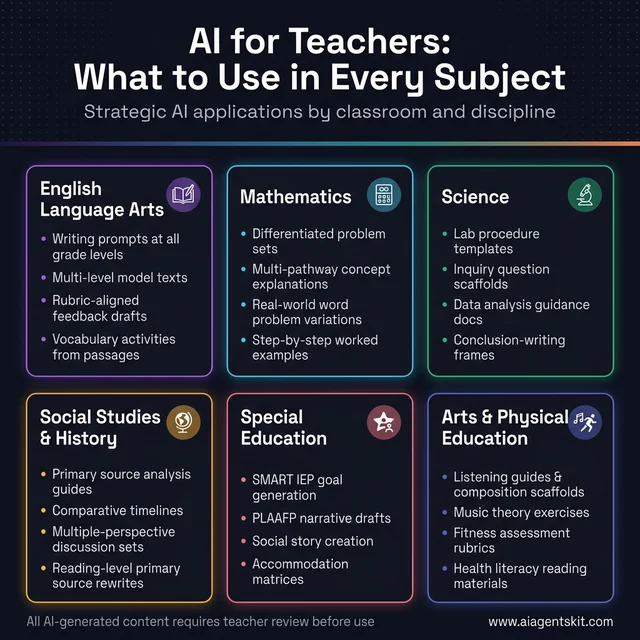
AI applications by subject area. Each discipline has distinct AI use cases that save meaningful time while maintaining instructional quality.
Across all subject areas, the honest ceiling of AI assistance is that teachers must remain active reviewers of everything AI generates. The professional standard hasn’t changed: teachers take responsibility for what students receive. AI makes the production process faster, not autonomous.
AI Literacy: What Students Need to Know in 2026
The statistic that most teachers find alarming and clarifying at once: Gartner predicts that by 2028, over 70% of educational content will be developed with Generative AI support. Students entering school today will graduate into workplaces where AI collaboration is expected, not exceptional. Teaching AI literacy isn’t a niche concern—it’s preparation for the reality students will inhabit.
Current data reinforces the urgency. Research indicates that 88% of students are using generative AI tools for assessments in 2025. That number hasn’t increased because schools failed to implement rules. It’s increased because students see AI as a natural tool—the way earlier generations saw calculators or the internet. The productive response isn’t prohibition; it’s leadership.
Critical evaluation skills are the most foundational component of AI literacy. Students need to understand that AI outputs require verification, that AI systems contain training biases that affect outputs, and that fluency with AI means knowing when to trust it and when to question it. These skills generalize beyond AI to broader information literacy—and educators across disciplines find that AI literacy instruction reinforces skeptical reading practices that were already pedagogical goals.
Teachers don’t need to become AI experts to teach these skills effectively. A classroom exercise as simple as asking students to fact-check one AI-generated claim about a topic they’re studying—then discuss what the process revealed—builds meaningful critical evaluation habits. The goal isn’t producing AI cynics who refuse to engage with the technology; it’s producing students who engage with calibrated trust rather than uncritical acceptance.
Academic integrity conversations perform better as genuine discussions than as policy announcements. The evidence on outright AI bans in schools is not encouraging—enforcement is inconsistent and the skills students need for future workplaces don’t get developed. More effective approaches include:
- Assignment design that emphasizes process (drafts, annotations, revisions) over final products AI can generate
- Explicit discussion of what AI use is appropriate for which tasks—established at the start of a unit, not in response to suspected violations
- Human-specific performance components: oral presentations, in-class writing, Socratic seminars
- Documentation of AI use as a classroom norm: treating acknowledgment as a skill rather than a confession
- Assignment specificity: topics that require personal experience, local knowledge, or real-time events AI cannot address authentically
Even experts debate the right balance between AI access and independent skill development. The productive stance acknowledges that different tasks warrant different levels of AI engagement—and that students need explicit guidance about those distinctions rather than a blanket rule that ignores the actual complexity.
Future-readiness skills round out the AI literacy framework. Effective prompting, critical evaluation of AI output, knowing when human judgment is essential—these are competencies with direct career value. A 2025 survey found that 66% of hiring managers already consider AI literacy when evaluating candidates. Teachers who explicitly develop these skills are genuinely preparing students for the world they’ll enter, not teaching to a distant hypothetical.
12 Copy-Paste AI Prompts for Teachers (Organized by Task)
The prompts below are production-ready—meaning they’re written with the specificity that produces usable first drafts, not generic responses. Copy, fill in the bracketed sections, and paste into ChatGPT, MagicSchool AI, Google Gemini, or any general AI tool. Each prompt includes a note on what it produces and the typical teacher review time required.
The universal rule before every prompt: Add your class context. Grade level, subject, class size, ELL count, and IEP accommodations needed—the more specific the input, the less editing the output requires.
📅 Group 1: Planning Prompts
Prompt 1 — Lesson Plan (Standards-Aligned):
“Create a [X]-minute [grade level] lesson on [topic] aligned to [standards code], for a class of [N] students including [X] English language learners at [proficiency level] and [X] students with IEPs requiring [accommodation type]. Include: a [X]-minute hook activity, direct instruction outline, guided practice, and a [X]-question exit ticket. Format as a table with columns: time, activity, materials, teacher notes.”
What you get: A complete, structured lesson framework with differentiation built in. Review time: 10–15 min.
Prompt 2 — Unit Plan Skeleton:
“Create a [X]-week unit plan for [grade level] [subject] on [unit topic], aligned to [standards cluster]. For each week, provide: the essential question, 2–3 key learning objectives, suggested lesson sequence (day-by-day), formative assessment strategy, and one suggested anchor text or resource. Format as a weekly table. Include a culminating performance task for the end of the unit.”
What you get: A full unit skeleton that takes 45–90 min to write manually. AI version: 2-minute generation, 20-min review. Saves an entire planning session.
🔀 Group 2: Differentiation Prompts
Prompt 3 — Reading Level Differentiation (3 Versions):
“Take the following passage [paste text] and rewrite it at three Lexile levels: [grade−2] level (
[Lexile] L), grade-level [grade] ([Lexile] L), and an enrichment version for advanced readers with added analytical complexity and extended vocabulary. Keep all key facts accurate. Add a 5-word vocabulary glossary at the bottom of each version, with student-friendly definitions.”
What you get: Three print-ready differentiated readings in under 90 seconds. No Lexile software subscription needed.
Prompt 4 — ELL Scaffold Pack:
“For the following assignment [paste assignment], create a scaffold support pack for English language learners at [beginning/intermediate] proficiency. Include: (1) a simplified version of the instructions in plain language, (2) 8 sentence frames for discussion participation, (3) a bilingual vocabulary list in English and [target language] with simple definitions, and (4) a graphic organizer to support written response. Grade level: [grade].”
What you get: A complete ELL support kit for any assignment. Eliminates the need to build scaffolds one at a time from scratch.
✅ Group 3: Assessment Prompts
Prompt 5 — Exit Ticket (3 Formats):
“Create three exit ticket options for a [grade level] lesson on [topic]. Each should check understanding of [specific learning objective]. Format 1: 3 multiple-choice questions. Format 2: a short-answer prompt with a sentence starter. Format 3: a visual response—a quick drawing or diagram prompt with 1 sentence of explanation. Keep each version to under 5 minutes of student completion time.”
What you get: Three format-varied formative checks for the same lesson—so teachers can rotate across the week without building each from scratch.
Prompt 6 — Rubric Generator:
“Create a [4-point / 6-trait] rubric for a [grade level] [assignment type—e.g., argumentative essay, lab report, oral presentation] on [topic]. Include the following criteria: [list 4–5 criteria relevant to the assignment]. For each criterion, write descriptors at all [4] performance levels: Exceeds Standard, Meets Standard, Approaching Standard, Below Standard. Format as a table.”
What you get: A complete, criteria-aligned rubric that typically takes 25–40 minutes to write. AI version: 60-second generation, 10-min review for accuracy and voice.
📝 Group 4: Grading & Feedback Prompts
Prompt 7 — Written Feedback Comments (Batch):
“I’m going to paste 3 student writing samples below. For each, generate 2–3 feedback comments aligned to this rubric: [paste rubric or key criteria]. For each comment: (1) name one specific strength with a text reference, (2) identify one growth area, (3) give one actionable next step the student can apply in revision. Keep each set of comments under 100 words. Maintain an encouraging but honest tone for [grade level] students.”
What you get: Rubric-aligned feedback drafts for multiple students simultaneously. Teacher reviews and edits each—turns 45-min grading into 15-min review.
Prompt 8 — Report Card Comment:
“Write a [50–75 word] report card comment for a [grade level] student named [first name]. Key observations: [strength 1], [strength 2], [growth area], [notable behavioral or social quality]. Trend: [improving / consistent / needs closer support]. Tone: professional, specific, and encouraging. Do not use generic phrases like ‘works hard’ without specifics. Avoid deficit framing. Write in third person.”
What you get: A specific, student-centered comment draft. Reduces 30-second-per-student composing time across a full class of 30 to a 5-minute review pass.
📧 Group 5: Communication Prompts
Prompt 9 — Concern Email to Parent:
“Write a professional and warm email to a parent about their child [first name] who has been [specific concern—e.g., struggling to submit assignments on time / showing signs of social withdrawal / frequently off-task during independent work]. Acknowledge [one genuine academic or personal strength]. Express concern clearly but without alarmism. Suggest [one concrete next step—e.g., a brief check-in call, a meeting, a home strategy]. Keep it under 150 words. Tone: supportive, not punitive. Do not use educational jargon.”
What you get: A draft that takes 2 min to personalize vs. 15–20 min to write from scratch—especially valuable for communications where tone is delicate.
Prompt 10 — Weekly Class Newsletter:
“Write a [200–250 word] weekly class newsletter for [grade level] [subject] families. This week: [bullet 1—what we learned], [bullet 2—upcoming assignment or assessment], [bullet 3—important reminder or event], [bullet 4—one positive classroom highlight]. Tone: warm, conversational, and brief. Include a ‘How to help at home this week’ tip at the end. Format with clear short paragraphs, not bullet points.”
What you get: A complete, family-ready newsletter from a 30-second bullet list. Frees 20–30 minutes per week for teachers who send regular updates.
📋 Group 6: SpEd & Documentation Prompts
Prompt 11 — IEP Goal (SMART + Measurable):
“Generate 3 SMART IEP annual goals for a [grade level] student with [disability category—e.g., specific learning disability in reading, autism spectrum disorder, speech-language impairment]. Target domain: [reading fluency / written expression / math calculation / social communication / behavior]. Current performance level: [describe baseline]. Goal timeframe: one academic year. For each goal, include: the goal statement, 2 short-term objectives with measurable benchmarks, and a suggested data collection method. Align to [state standards if applicable].”
What you get: Three complete SMART goals with objectives and data collection methods—documentation that typically consumes 20–30 min per student per domain. Always verify against student-specific data before including in a formal IEP.
Prompt 12 — Accommodation & Modification List:
“Create a list of [8–10] appropriate classroom accommodations and [4–5] modifications for a [grade level] student with [disability/diagnosis]. Organize into two categories: Presentation Accommodations (how content is delivered) and Response Accommodations (how the student demonstrates learning). For each, include a one-sentence rationale connecting it to the student’s needs. Also suggest 2 assistive technology tools that may support this student’s access. Format as a structured list.”
What you get: A well-organized accommodation inventory that anchors IEP team discussions and ensures teachers across subject areas have clear, actionable support strategies.
A note on all prompts above: These are first-draft generators. Every output requires teacher review before use—for accuracy, student specificity, and professional judgment. The goal is eliminating the blank page, not eliminating the teacher.
Frequently Asked Questions
What is the best free AI tool for teachers?
Several strong options are free for individual teachers. MagicSchool AI offers a free tier with access to most of its 80+ education-specific tools, though it doesn’t save work history. Khanmigo’s teacher tools are free with a Khan Academy account. Google Gemini is included for Google Workspace for Education subscribers. ChatGPT’s free tier (GPT-5-Mini) handles general planning and content creation tasks well, though it lacks education-specific context that dedicated tools provide.
How much time does AI really save teachers each week?
According to the Gallup and Walton Family Foundation 2025 research, teachers who use AI at least weekly save an average of 5.9 hours per week—roughly six extra weeks over a school year. The Education Endowment Foundation found a 31% reduction in lesson preparation time for participating teachers. Time savings increase with practice; new AI users typically see smaller gains in the first 4-6 weeks before workflows become efficient.
Will AI replace teachers?
No credible research supports this conclusion. AI automates information-processing tasks and content generation. It cannot build the relationships that motivate student persistence, provide emotional support during difficulty, make the nuanced judgment calls that depend on knowing a specific child, or create the classroom community that makes learning possible. Teachers who develop AI proficiency typically become more valuable—they deliver the efficiency benefits AI enables while retaining the irreplaceable human elements that make teaching effective.
How can AI help with differentiated instruction for diverse learners?
AI compresses the time barrier that has historically made genuine differentiation impractical. A teacher can request reading-level variants of the same text, scaffolded and extension versions of an assignment, vocabulary support materials for English language learners, and IEP-aligned accommodation suggestions—simultaneously, in minutes. The teacher’s role shifts from materials creator to materials selector and customizer, which is where professional expertise applies most.
What AI tools work best for grading student writing?
Writable and Class Companion are the most teacher-trusted options for writing feedback at scale. Both generate rubric-aligned feedback drafts that teachers review and approve. Gradescope handles larger-volume assessment including essays, with AI-assisted grouping of similar responses. For formative feedback without a dedicated platform, pasting anonymized student writing into MagicSchool AI or a general AI tool with a specific feedback prompt produces useful starting points for teachers to customize.
What are the best ChatGPT prompts for teachers to use?
The most effective ChatGPT prompts for teachers follow a consistent structure: subject + grade + standard + class makeup + output format. Three consistently high-performing templates: (1) For lesson planning, specify grade, standards code, class size, ELL and IEP counts, time available, and desired output format (table, bullet points, narrative). (2) For differentiation, paste source text and request three Lexile-level rewrites with vocabulary support. (3) For parent emails, describe the situation, desired tone, and word limit—AI produces a draft that takes 2 minutes to personalize.
The key insight is specificity: every detail added to a prompt narrows the output toward something classroom-usable. Teachers who habitually provide context in prompts report dramatically better results than those using one-line requests.
How do I stop students from using AI to cheat on assignments?
The most effective approaches change the assignment design rather than relying on detection. Process-based assessments (multiple drafts with reflections, in-class writing components, oral defense of written work) are harder to AI-complete than single-submission products. Assigning topics with personal specificity—local history, family narratives, current events affecting the student’s community—produces prompts AI can’t answer authentically. AI detection tools exist but have documented false-positive rates that create fairness concerns. Teaching explicit AI literacy policies, with student acknowledgment of what’s permitted, outperforms blanket prohibition in most documented implementations.
Can AI help prevent or reduce teacher burnout?
The connection between AI and burnout is well-documented: teachers most at risk of burnout consistently cite workload volume and administrative unsustainability as primary drivers. Research suggests AI can reduce the specific tasks most associated with burnout triggers—endless after-hours grading, last-minute lesson pivots, repetitive communication drafting, and the documentation marathon that comes with IEP season.
The mechanism isn’t motivational; it’s structural. When a 30-minute task becomes a 7-minute task, the time returns to wherever it’s most needed—whether that’s lesson refinement, student relationships, or simply leaving school at a reasonable hour. AI won’t fix systemic workload issues or unsupportive school cultures, but it meaningfully addresses the time crunch that pushes otherwise committed teachers toward exit. Educators who report the highest AI-related satisfaction consistently describe it as “getting back time to do the parts of teaching I actually went into this for.”
Is it ethical for teachers to use AI to create classroom materials?
The professional consensus is yes, with appropriate transparency. AI generates drafts; teachers review, edit, and take professional responsibility for the final product—the same model that applies to any tool that generates content for teacher use. Transparency with students about AI use in content creation models the ethical use practices educators want to cultivate. The relevant ethical question isn’t whether AI was used; it’s whether the final materials serve students well and whether the teacher can stand behind their quality. Student data must remain protected—FERPA compliance applies regardless of which tools are used.
What are the biggest risks of using AI in K-12 classrooms?
Four risks receive consistent attention from education researchers: AI hallucination (confidently incorrect information), particularly for factual claims and historical details; equity concerns (unequal access to AI tools across school district resource levels); bias in AI-generated content (some AI systems underperform for dialects, cultural contexts, or student populations underrepresented in training data); and over-reliance that degrades student skill development when AI is used as a replacement rather than a support. All four risks are manageable with appropriate teacher oversight and intentional implementation.
What is the best AI tool for writing IEP goals?
MagicSchool AI’s IEP goal generator is the most widely used, offering goal generation by disability category, grade level, academic domain, and measurable benchmark format. Playground IEP (marketed as IEP CoPilot) is a dedicated platform designed to generate full IEP sections including goals, objectives, and PLAAFP frameworks aligned to IDEA standards. Monsha.ai focuses on IDEA-compliant goal generation with state standards mapping. All three require the teacher to input specific student performance data to produce meaningful output—the goal generator is only as specific as the information provided. Final IEPs must always reflect individualized, educator-verified content.
Can AI tools integrate with Google Classroom?
Yes—several of the leading education AI tools connect directly to Google Classroom workflows. Brisk Teaching operates as a Chrome extension embedded in Google Docs, Slides, and Classroom. Google Gemini is integrated into Google Workspace for Education with features including grading assistance and parent email drafting. MagicSchool AI outputs can be imported into Google Docs. Teachers already operating in a Google ecosystem experience the lowest adoption friction with these integration options.
How should teachers disclose AI use to students and parents?
Research supports transparent disclosure as the most professionally defensible approach. Teachers who acknowledge AI use in materials creation report that students typically find it unsurprising and that disclosure opens productive conversations about AI literacy. A simple policy statement—shared at the start of the year, covering which tasks AI assists with and how final materials are reviewed—sets clear expectations. The parallel to other professional tools (copy editors, instructional coaches, planning templates) is worth making explicit: AI use doesn’t diminish professional responsibility for the final product.
How to Start Using AI for Teaching Without the Overwhelm
The teachers getting the most out of AI didn’t overhaul their entire practice in one school year. They identified one time-consuming task, tried an AI tool for that specific function, evaluated the result honestly, and expanded from there. The incremental approach compounds quickly—one workflow streamlined becomes two, then five, then a fundamentally different relationship with administrative work.
A Special Note for New and First-Year Teachers
First-year teachers face a specific version of the AI question: everything is new simultaneously. There’s no personal library of lesson materials to fall back on, no archive of parent emails to reference for tone, no established pacing rhythm for any unit. AI is arguably more valuable for new teachers than for any other segment of the profession—not because it replaces the expertise they’re developing, but because it eliminates the blank-page friction at the exact moment when blank pages are most paralyzing.
Three AI workflows with the highest return for early-career teachers:
- The 11pm lesson plan problem — When tomorrow’s lesson isn’t ready and energy is gone, a detailed prompt to MagicSchool AI or ChatGPT produces a workable starting framework in minutes. Not perfect, but far better than sleeping through the planning.
- The tricky parent email — New teachers often agonize over tone in sensitive communications. AI drafts a version that can be reviewed, adjusted, and sent with confidence.
- The differentiation gap — New teachers want to differentiate but often lack the material bank to do so quickly. AI generates reading-level variants of any text in under 60 seconds.
For new educators building their foundations, MagicSchool AI and Khanmigo are the recommended starting points—both are free, both are education-specific, and both produce outputs that require professional review rather than encouraging passive acceptance.
The tools exist. The time savings are documented. The remaining question, for most educators, isn’t whether AI is useful. It’s which specific function to start with.
For those ready to act, exploring education-specific AI prompts provides ready-to-use templates for the most common teacher use cases—lesson planning, assessment creation, parent communication, and differentiation—without requiring mastery of prompt engineering before getting useful outputs.
The time saved belongs back to the students. That’s been the case since the first teacher picked up a photocopier instead of handwriting 30 copies. AI is a larger version of the same trade—efficiency for attention—and the analysis of whether it’s working asks the same question: is there more time for what matters?